
Mindtickle
SaaS
Sales Enablement
Integrations
B2B
Building a content integration experience for
the enterprise
By listening closely and going beyond the core brief, we designed an end-to-end integration workflow that directly drove higher user satisfaction scores.
Hey John,
Total Integrations
24
Connected Integrations
12
Broken Integrations
02
List of integrations

Cloudtalk
Outreach


Salesloft

Salesforce

AEM

All

One drive

Google Drive

Adobe Exp. Manager


Project Details
My Role
Sr. UX/Product Designer &
UX Researcher
duration
5 months
Team
Me Lead Designer
and 2 Product Managers
Company
Mindtickle
01 - Context
Background and the issue
Mindtickle is a market-leading sales readiness platform helping revenue teams at Johnson & Johnson, Splunk, and Wipro increase knowledge and adapt to change.
Enterprise users stored sales content in external platforms - Google Drive, Adobe Experience Manager, Box, SharePoint. To use that content inside Mindtickle's learning modules, someone had to manually download and re-upload it every time the source changed.
This created a cycle of duplication, version drift, metadata loss, and wasted hours. For clients like Hitachi and Philips managing hundreds of files, the problem compounded weekly.
The ask
Build an integration system between external enterprise storage and Mindtickle - eliminating the manual content duplication loop entirely.

5
months
4
people
3
integrations
The personas we were solving for
Site Owner
Super Admin
Full cross-platform permissions and access. The decision-maker for what integrations get enabled.
Goals - Supervise the overall workflow; ensure content is secure and consistently available.
Pain - Not enough support from cross-functional teams when rolling out new tooling.
Content Expert
Assisting Admin
Invited on a use-case basis to help manage content. Doesn't have full admin rights.
Goals - Assist in managing the content repository - keep it clean, current, and accessible.
Pain - Lack of visibility into content permissions and scope creates confusion and duplication.
Enablement Admin
Content Creator
Owns the creation and management of training content. The primary daily user of the sync feature.
Goals - Have the most updated content available for learners without manual overhead.
Pain - Too many content change requests pile up - manual re-uploads make turnaround slow.
02 - Problem and Research
What was breaking?
01
Every content edit in external storage triggered a full manual re-upload cycle - download, re-attach metadata, re-upload into Mindtickle.
02
No version control across systems - multiple people uploading conflicting versions caused errors in live learning modules.
03
Metadata had to be re-attached manually on every re-upload, doubling effort for every change.
04
Different personas had different permission scopes with no cross-chain visibility.
05
Enterprise clients raised data security concerns about content moving between systems without controls.



The actual pain points of the users!
01
Complexity of manual implementation
Users found the process time-consuming and error-prone, difficult to maintain consistently across teams.
02
Version control breakdown
Manual sync led to confusion about which version was current, creating discrepancies inside Content Hub.
03
Content inconsistencies
Gaps between external storage and Mindtickle modules caused confusion among sales teams and hindered training.
04
Data security concerns
Multiple personas with different permissions - users emphasised the need for controlled content movement.
05
Need for customisation
Users wanted to select specific folders or files for sync, not a blanket all-or-nothing approach.
06
Desire for real-time updates
Users needed automatic sync so the latest content was always available without manual intervention.
Snippets from our initial research calls
The system architecture of the Mindtickle platform
Snippets from our initial research calls
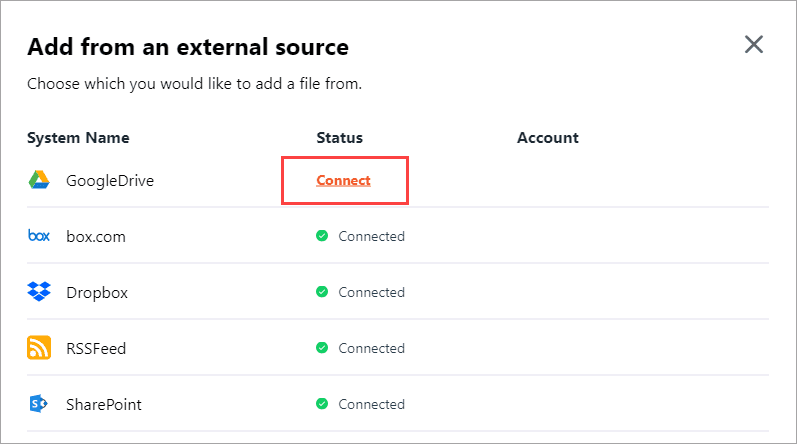


Snippets from AEM, G2 and Hubspot
03 - Research
How did competitors solve this problem?
Users could sync individual content with external storages
Users could set up libraries that were synced
Admin and super admin distinction across sync actions
Sync frequency settings (daily, weekly, real-time)
Sync dashboards and activity logs for visibility
Bi-directional sync support
Plugin-enabled sync (AEM)
Metadata mapping - present in some, absent in others
Directly link external storages without leaving the platform
What we did next and how did we arrive a a feature list?
We combined the features from our competitive analysis and ideated on probable solutions based on the pain points of the users. Below is a list of all features we planned to develop. The Blue ones were suggested by the team at Wolfkraft where as the grey ones were internal suggestions.
Account settings page
Redesign of integration cards
Single CTA for the whole page
Integration setup
Authentication-based settings
Folder and metadata mapping
Sync frequency selection
Failure notification settings
Sync log
Sync log page
Re-sync CTA
Content Hub
Sync state icons
Content status notifier
View sync details
04 - Wireframes
Stakeholder validation through wireframes
Hi-fi wireframes built from Mindtickle’s design library - close enough to production to get decisive feedback from internal teams and clients.


These two screens required a walkthrough with UI - sync statuses needed colour for accurate state representation.
Key feedbacks received on wireframes
01
Metadata selection method
Users found per-file metadata selection unusable at enterprise scale - lists were too long and inconsistent per client. Shifted to a centralized metadata sheet uploaded once.
02
Folder naming concerns
Users didn't care about folder names on the Mindtickle’s side. As long as the synced source was identifiable, they were satisfied - simplified naming UI.
03
SYNC DETAIL VISIBILITY
Users wanted to drill into failed syncs, not just see a status badge. Led to the full sync log with per-file status rows and re-sync CTA.
04
COMPONENT CONSTRAINTS
Development flagged bandwidth constraints on the sidepanel component. Replaced with a modal stepper to keep the feature on the roadmap without blocking release.
05 - Visual Design
What we shipped
Authenticate once, link folders, set sync intervals, walk away. Content stays current in Mindtickle automatically.
Before → After
Account settings page

Before
Legacy design language inconsistent with the rest of the platform
of Mindtickle
No clear entry point for setting up a new integration
Multiple CTAs creating decision paralysis for admins
Hey John,

List of integrations
Active
Salesforce

Last updated: July 12, 2023 | 04:00pm
Error
Outreach

Last updated: July 12, 2023 | 04:00pm
InActive
Salesloft

Last updated: July 12, 2023 | 04:00pm
AEM


Active
Zoom
Last updated: July 12, 2023 | 04:00pm
InActive
AEM

Active
Webex
Active
Zoom
Last updated: July 12, 2023 | 04:00pm

InActive
Google drive
Active
Webex
Last updated: July 12, 2023 | 04:00pm
After
Account settings page redesigned into a modular page with a new left navigation and a modular list of categorised integrations
Single primary CTA eliminates ambiguity in page and mitigates
overload by progressive disclosure of integration information.
All new screens

First-time setup: clear call to action, no legacy noise.

Three-step stepper. Account credentials and connection name.

Manual control over the files and file directories to sync

Failure controls when sync fails

Admins drill into sync history, view failures, trigger re-syncs.

Sync state icons show sync state to content experts and lower admins.
06 - Impact
The CSAT Scores
We surveyed the CSAT scores among the internal users by asking quantitive questions
110
Total responses
4.3/5
User satisfaction score
81.8 %
Satisfaction score
Very Satisfied
Top Rating

CSAT Analytics results page for the project
Thank you for scrolling through!
Want to see another work of mine? This one’s a B2B2C project where I got to dive into UX research to drive card adoption.
rath.desh@gmail.com
9040144121